01
First Dates
Swiping right shouldn't mean rolling the dice. SafeMeet runs silently in the background, every time.
Live location + timed check-in
Learn more →SafeMeet is a personal safety app: timed check-ins, live location sharing, and silent emergency alerts that keep running in the background — so the people who matter know where you are when it counts.
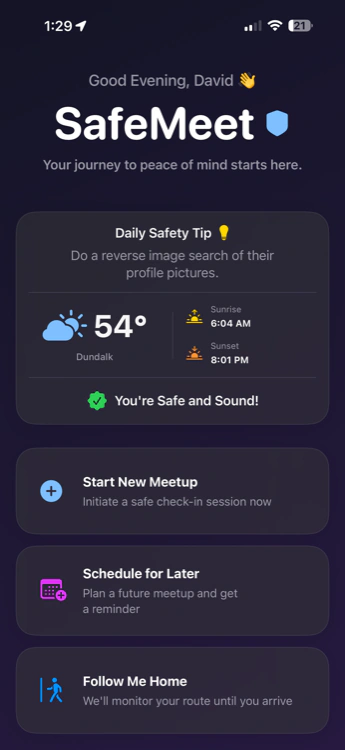
Structured timelines and automatic escalation — configurable in under 60 seconds. SafeMeet runs invisibly until it needs to act.
Enter where you're going, who you're meeting, and for how long. Search any location by name directly on the map.
SetupChoose up to 3 contacts to receive alerts. Set your check-in interval — every 1, 5, 10, or 15 minutes.
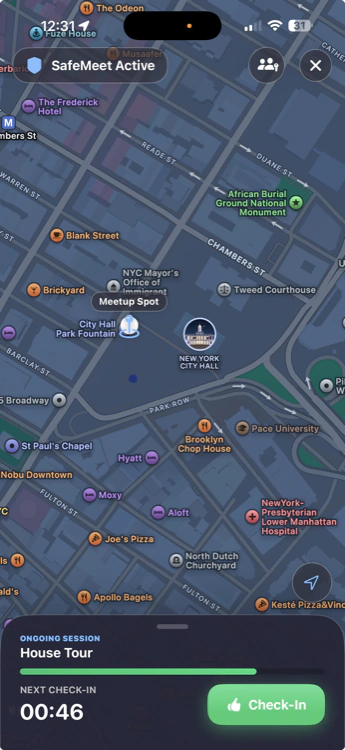
ConfigureSafeMeet prompts you quietly. One tap — I'm Safe — keeps everything calm. Your contacts see nothing if all is well.
ActiveMiss a prompt? A silent countdown begins. Nobody is alerted yet, so a slow walk or a dead pocket-tap doesn't wake your contacts.
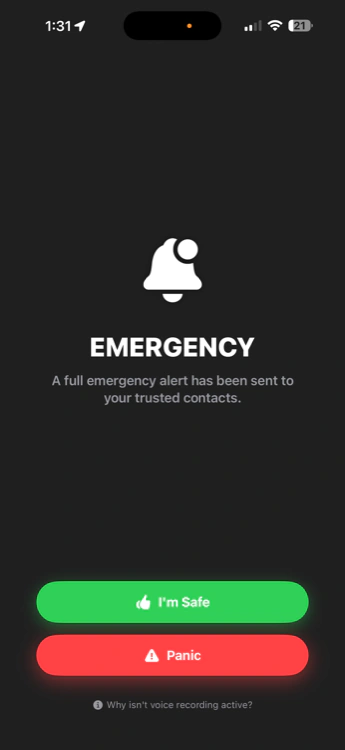
Grace PeriodStill no response? Audio records silently. Contacts get live GPS, meetup details, and a secure audio link. Manual panic skips grace entirely.
Emergency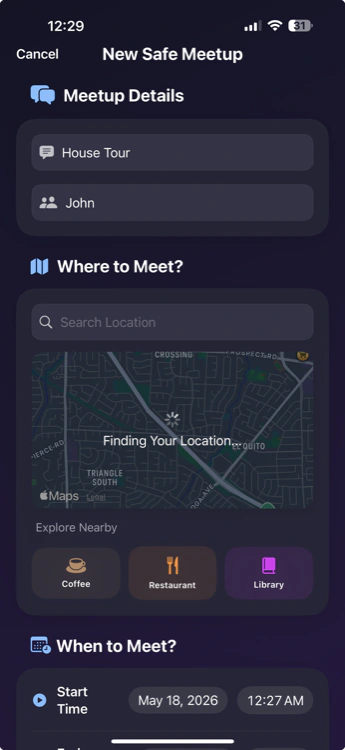
SafeMeet was built for the real moments when you need a quiet safety layer — without making it weird or awkward.
Swiping right shouldn't mean rolling the dice. SafeMeet runs silently in the background, every time.
Meet at a public safe-exchange zone, pin your live location to someone you trust, and keep ambient audio one tap away.
Showing a home to a stranger? Your broker knows exactly where you are at every moment.
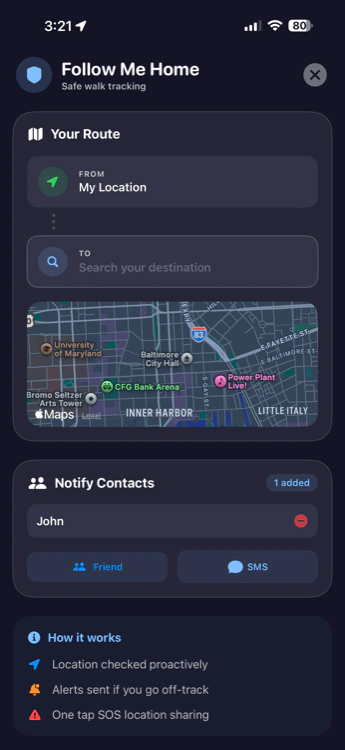
Walking to your car, taking a rideshare, or heading home alone — Follow Me Home has you.
A lot can happen between leaving the office and unlocking your door. Follow Me Home monitors your entire journey — automatically.
Push notifications require the app. SMS does not. Elite members ensure contacts receive texts even without SafeMeet installed — the true last resort when everything else fails.
A missed check-in triggers a 60-second grace window. No response? Full escalation fires: live GPS, an audio clip if recording is on, and SMS to every trusted contact.
Bypasses all grace periods. Fires immediately. One tap in your worst moment is all it takes to alert everyone who matters.
When an emergency fires and recording is on, SafeMeet captures a short ambient clip and shares it with your trusted contacts through a private, expiring link. Your phone shows its usual microphone indicator while recording. Recording laws vary where you live.
Instantly cancels all alerts and notifies your contacts you're okay. Quick, clean, and no unnecessary drama.
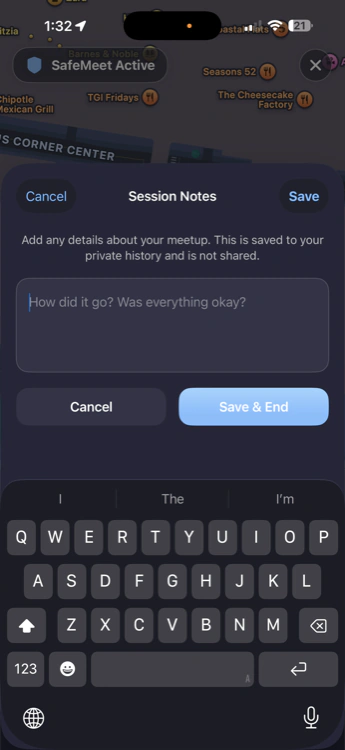
Every session can include private notes — saved only to your device, never shared, never uploaded. Your safety history, on your terms.
From a quick "watch over me" to silent emergency escalation — meeting strangers, walking home, living alone, and everything in between. Fifteen tools, one calm interface.
Explore all featuresWe're a small, independent team — not a faceless corporation. Automation does the constant work of watching, checking in, and escalating: reliably, around the clock, so nothing slips through. We put our limited resources where they protect you most — encrypting sensitive data, hardening our servers as best we can, and testing the logic that decides when to reach your people. And we're honest about what we can and can't promise.
We're self-funded and can't out-spend a giant — so we spend where it counts: keeping your data private and protected, careful server hardening, and escalation logic we test rather than guess. Obsessive about the essentials, upfront about our limits. SafeMeet is a safety aid, not a guarantee.
We collect the minimum, encrypt sensitive details at rest, and never sell your information or feed it to train models. Privacy isn't a setting you hunt for — it's the default we built on.
SafeMeet learns your routine on your device and offers to watch over you right when you head out — a gentle, optional nudge. Smart where it helps you, careful where it counts.
SafeMeet is in open beta and has no public store rating yet, so there are no review scores to show you. Here is what a session actually looks like in the three situations people set one up for most.
You start a session before you leave and pick one person to watch it. They see your live location and your expected finish time. Ambient audio stays one tap away if the handoff turns tense, and the session ends the moment you tap "I'm done".
Follow Me Home watches the route instead of a single pin. If you don't confirm arrival, a 60-second grace window runs first — then your contact gets your last known location by push, with SMS as the fallback if the push doesn't land.
One session per showing, with the check-in interval set to the length of the appointment. Your broker or a colleague is the watcher. A silent duress PIN unlocks the app normally on screen while quietly telling the server something is wrong.
SafeMeet for Teams adds centrally managed seats, work-session status, timed check-ins, emergency escalation, and audit trails for realtors, field-service crews, mobile professionals, and other people who routinely enter unfamiliar places. Personal activity stays outside the employer view.
Safety shouldn't be a luxury. SafeMeet's core features are, and always will be, completely free.
Everything you need to stay safe from day one.
The most redundancy SafeMeet offers — more ways for an alert to get through when one of them fails.
The full SafeMeet safety suite for up to 6 people you invite — one plan, one bill.
Privacy pledge: We do not sell your data. Location history exists only for the safety and history features you choose, is protected in transit and at rest, and can be stopped, paused, or deleted through your privacy controls.
SafeMeet is live in beta on iPhone, with Android in active development. Join the waitlist for early access and launch updates across both platforms.