Beta Now Open iOS Only 4.9 ★ Rating

Your Personal
Safety, Always On

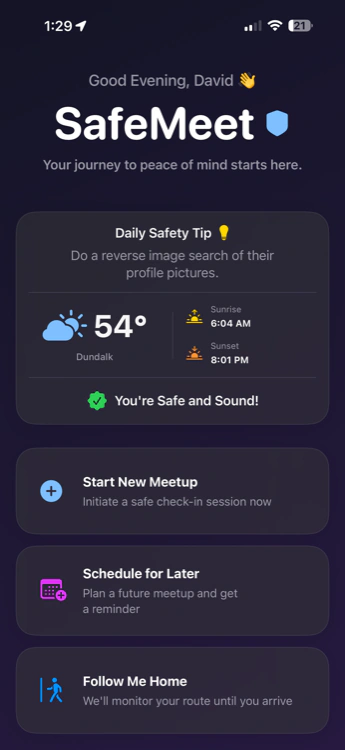
Meeting a stranger from a marketplace, showing a property, going on a first date, or walking home alone at night — SafeMeet quietly runs in the background so the people who matter most can always find you when it counts.

Free core features
Privacy-first
247+ Beta users

The Data

The Numbers Demand Action

Every statistic below is sourced from peer-reviewed research and official government data. This is the world SafeMeet was built for.

57%

Women harassed on dating apps

Pew Research 2020
2/3

Violent crimes by acquaintances

BJS.gov
↑330%

Rise in marketplace robbery 2019–23

NIJ.gov
73%

Realtors have feared for safety during a showing

NAR Safety Report

Online Dates

Swiping right shouldn't mean rolling the dice. Check-in securely — the app runs silently so you don't have to make it awkward.

Real Estate Agents

Showing properties alone to complete strangers. 73% of realtors have felt unsafe. Your broker knows exactly where you are.

Marketplace Sales

Craigslist and Facebook meetups are up 330% for robberies. Verify yourself with a Safety Score and record audio if things go south.

Late-Night Commuters

Walking to your car, taking a rideshare, heading home alone. One tap activates Follow Me Home — your trusted contacts watch every step.

Now in Beta

Follow Me Home
Walk Alone. Never Truly.

A lot can happen between leaving the office and unlocking your front door. Follow Me Home monitors your entire journey home, detects when something is wrong, and alerts the people who care about you — automatically.

Set Your Route & ETA

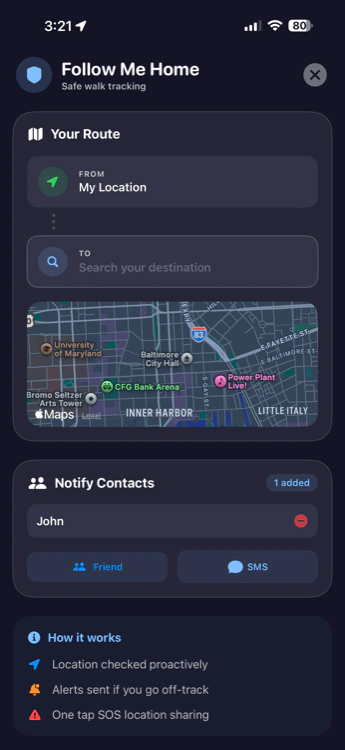
Enter your starting point and destination. SafeMeet calculates your expected arrival time and shares it with your trusted contacts.

Live Route Monitoring

Your GPS path is compared against your planned route in real time. Significant deviation triggers an immediate alert to your contacts.

Sudden Event Detection

Accelerometer and gyroscope sensors detect sudden falls, impacts, or stops. If you don't respond within 60 seconds, the full panic protocol activates.

Missed ETA Alert

Didn't make it home by your expected time? Contacts are automatically notified with your last known location — even if your phone dies.

Safe Arrival Check-In

Arrive home? Tap "I'm Home" to instantly notify your contacts and close the session. They rest easy. You rest easy.

Follow Me Home

Beta

Real-time walk-home protection with automatic escalation

Route Active
ETA 11:34 PM · 0.8 mi
On
Route
0.8mi
Remaining
11:34
ETA

Fall Detection

Sudden drop in G-force triggers immediate check-in prompt

Route Deviation

250m+ off route alerts contacts automatically

Missed ETA

Didn't arrive? Contacts notified with last known GPS

Home Safe

One tap "I'm Home" closes session, notifies everyone

Private Beta Access

Next-Gen Protection,
First Available to You

Beta users get every new feature completely free. Help us build the most trusted personal safety app on iOS.

New

Live 24/7 Friend Tracking

Real-time location sharing with trusted contacts — all day, every day, without killing your battery. Engineered to use just ~0.75–1% battery per hour, tested on iPhone 16 Pro Max & 17 Pro Max running iOS 26 and 26.2. The most battery-efficient live tracking we've built.

~1% / hr battery
iOS 26 verified
Live updates
New

Circles — Smart Geofenced Zones

Draw virtual boundaries around places that matter — home, school, work. The moment someone enters or leaves, you get an instant push notification.

Safe & danger zones
Beta

Follow Me Home

Route monitoring, fall detection, ETA alerts, and safe-arrival check-in. Walk home alone — never truly alone.

Walk protection
New

Trip Replay

See the exact route a friend took on any completed trip. Crash and speeding events appear inline. Stored privately, visible only to shared contacts.

Beta

Crash & Speeding Detection

Phone sensors detect high-impact collisions during trips. No response within 60s? Contacts are alerted immediately with your exact location.

Active testing
Upgraded

Emergency Audio Recording

A full 5-minute high-quality recording in just ~1.8MB. When Final Panic triggers, audio begins automatically in the background. Uploaded securely, delivered via one-time link. Once downloaded, it's permanently deleted from our servers. SafeMeet never listens.

~1.8MB / 5 min
Encrypted upload
Deleted post-download

Sourced Research

The Data Behind
the Necessity

We didn't build SafeMeet because it sounded like a good idea. Every design decision traces back to a real statistic, a real incident, a real person who needed help and didn't have it.

Dating & Online Interactions

57% of women and 35% of men report experiencing harassing behavior from someone they met on a dating platform.

Pew Research Center, 2020

Familiarity Risk

According to the U.S. Bureau of Justice Statistics, two-thirds of all violent crimes are committed by someone known to the victim — an acquaintance, friend, or colleague.

Bureau of Justice Statistics

Real Estate Safety

The National Association of Realtors found that 73% of real estate professionals have feared for their personal safety at some point during a property showing.

NAR Member Safety Report

Marketplace Crime

The National Institute of Justice documented a 330%+ increase in reported robberies at online marketplace meetups between 2019 and 2023.

National Institute of Justice
57%

Women harassed
on dating apps

2/3

Violent crimes by
acquaintances

330%

Rise in
marketplace crime

73%

Realtors feared for
their safety

Our Mission

Safety shouldn't be a luxury. SafeMeet's core features are and always will be completely free — because the right to feel safe is not a premium tier. Free for everyone, forever.

Everything Included

Complete Protection,
Zero Compromise

Live Safety Sessions

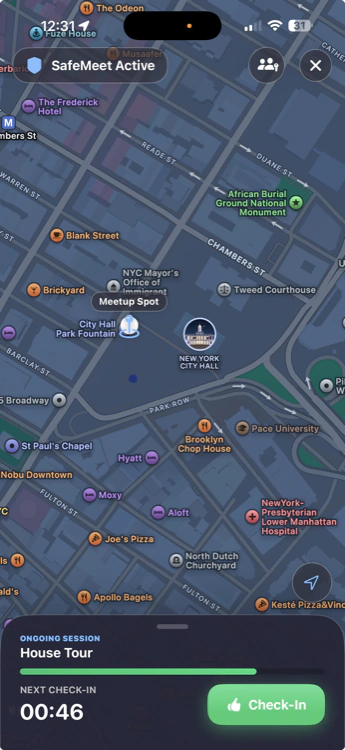
Start a timed session for any encounter. Set a duration and check-in interval. The automated protocol runs silently until you end it safely — or it escalates if you don't.

Follow Me Home

Walk home alone — never truly alone. Route monitoring, fall detection, missed ETA alerts, and safe-arrival confirmation. Available in beta.

Beta

Manual Panic Button

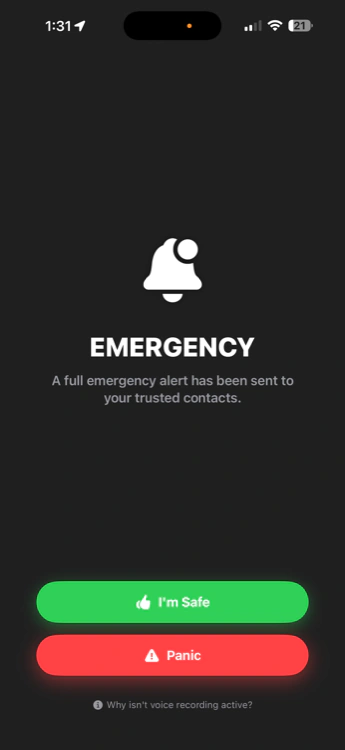
One tap. Trusted contacts get an immediate alert with your live GPS and map link. Bypasses grace period and consent — getting help is what matters.

Meetup History Log

Every session privately logged — date, time, location, audio if recorded, personal notes. A discreet paper trail stored locally on your device.

SMS Alerts Elite

Push notifications require the app. SMS does not. Elite members ensure contacts receive texts even without SafeMeet installed — the true fallback.

Trusted Safety Network

Build a circle of up to 5 trusted contacts (unlimited with Elite). They receive your alerts, live location, and emergency audio — the people who will actually show up.

Public Safety Profiles Beta

Create a verifiable profile with a Safety Score. Let strangers see you're a verified, trusted person before you even shake hands — or open the door.

Crash Detection Beta

Sensors detect high-impact collisions. If you don't respond within 60 seconds, contacts are alerted with your location — automatically.

Low Battery Alerts

When your battery gets critically low mid-session, contacts are notified in advance with your last confirmed location — before your phone goes dark.

Simple to Use

How SafeMeet Works

Up and running in under a minute. Here is the exact automated timeline when things go wrong.

1

Setup

Create Your Session

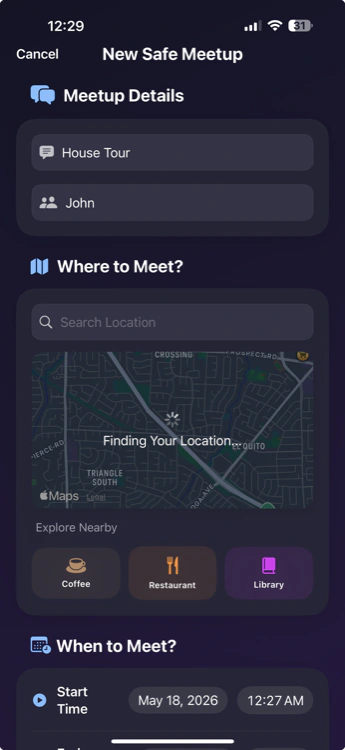
Enter where you're going, who you're meeting, and how long. Search any location by name or tap the map to pinpoint it.

2

Configure

Choose Your Safety Settings

Select trusted contacts. Set check-in interval (10, 15, or 30 min). Choose whether audio recording and live location sharing are enabled.

3

Running

Stay Connected via Check-Ins

SafeMeet prompts you. One tap — "I'm OK" — keeps everything calm. SafeMeet is invisible until it needs to act.

4

Grace Period

Missed Check-In — 60s Window

Miss a prompt? A silent 60-second countdown begins. No alerts have fired. Nothing escalates until those 60 seconds expire — eliminating false alarms.

5

Initial Alert

Initial Panic — Brief Alert Fires

After 60s: your contacts receive an urgent notification — you missed a check-in, plus meetup details and last confirmed location.

6

Final Panic

Final Panic — Audio & Full Details

Still no response? Audio records silently. Once complete, contacts get full location details and the secure audio link. Manual panic bypasses the 60s grace entirely — immediate full escalation.

Done

End Your Session — All Logged

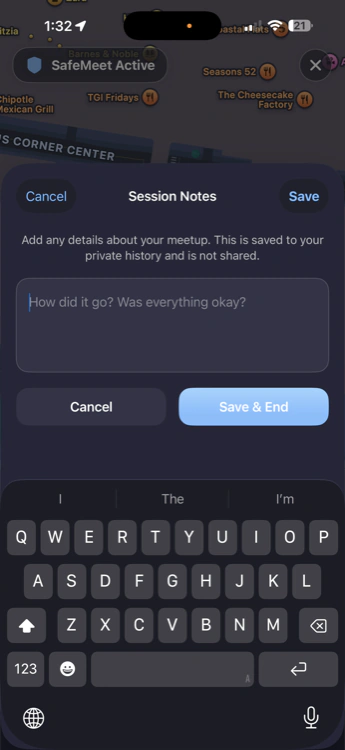
Safe? Close the session. Everything is privately logged — time, location, notes. No alerts needed? Great. The record still exists if you ever need it.

Real Situations

SafeMeet In Action

Two outcomes. One app. See exactly what SafeMeet does — both when everything goes smoothly and when it doesn't.

A Date That Went Great

SafeMeet ran silently. Nobody knew it was there.

40 seconds to set up

Sarah adds the restaurant, a 2-hour session, 20-minute check-ins, and her roommate as a trusted contact.

Her roommate follows along

Live tracking shows Sarah arriving safely. No "are you okay?" texts needed — zero anxiety for either of them.

Three discreet check-ins

A brief vibration prompt — she taps "I'm OK" without breaking conversation. Her date never noticed.

Session ends, log saved

Great date. She closes the session. Private log captures location and notes. No alerts ever fired.

Marketplace Meetup Gone Wrong

SafeMeet activated. Help was on the way.

Selling a laptop

Marcus adds the coffee shop, 30-min session, 10-min check-ins, audio enabled.

Things shift — check-in missed

The buyer insists they move to a car. Marcus can't check in. The 60s silent grace window begins. Nothing alerted yet.

Initial Panic fires

60s later: his brother gets an urgent push — missed check-in + last known location + meetup details.

Final Panic fires

No response. Audio records in the background. Brother receives full GPS and secure audio link.

Informed help, fast

Brother hears the audio, has the exact location, and calls for help immediately. Evidence already recorded.

Walking Home After a Late Shift

Follow Me Home scenario — 11:40 PM

Aisha activates Follow Me Home

She sets her home address, 0.8 mile walk, ETA 11:48 PM. Her sister gets a live tracking link.

Sudden fall detected

She slips on ice. Accelerometer spike triggers a check-in prompt with a 60s window.

No response — alert fires

Sister receives exact coordinates, "Possible fall detected," and a map pin — immediately.

Aisha is okay — checks in

Just a stumble. She taps "I'm OK." Sister gets confirmation. Session continues to home safely.

The Realtor Showing Alone

73% of agents have feared for safety during a showing

Agents show empty properties to strangers — alone — every day. SafeMeet was designed with them in mind. Priya's broker gets live location access and 30-minute check-ins during every showing. Her Public Safety Profile shows prospective clients a verified Safety Score before the meeting even starts.

Live location shared with broker throughout showing
30-min check-ins with full auto-escalation
Public Safety Profile builds client trust before arrival
Audio records if panic fires — evidence preserved
Meetup log stores client alias & property address

Upgrade Your Safety

SafeMeet Elite

Core features are always free. Elite adds the redundancy layer that makes the difference in a real emergency — the fallbacks that work even when conditions aren't perfect.

SMS Alerts — No App Needed

Text alerts reach contacts even without SafeMeet. Includes location and secure audio link. True fallback.

Unlimited Voice Storage

Cloud storage for all emergency recordings. Delivered to contacts, then permanently deleted.

Unlimited Contacts & Circles

Expand your safety network without limits — unlimited trusted contacts and geofenced zones.

Priority Live Tracking

Enhanced location refresh rates — contacts see where you are, faster.

Priority Support

A direct line to the SafeMeet team for faster, dedicated human help.

Beta Feature Access

First access to Follow Me Home Pro, crash detection, Safety Score, and every new feature before public release.

Unlock Elite

Who We Are

Built by People Who
Believe Safety Is a Right

We're a small, US-based team building personal safety technology for everyday people — not enterprises, not governments. Just you.

We're not a data broker or a surveillance product. We've been transparent since day one: a free, privacy-first tool that gives the people who care about you the ability to help when it matters most.

Privacy by Design

Audio recordings are never accessed or reviewed by SafeMeet. Shared only with contacts you select. Deleted after download. Your data lives where you put it.

No Ads. No Data Selling. Period.

Revenue comes from Elite subscriptions only. Your location, recordings, and personal data are never monetized or shared with third parties.

Legitimate US Company

SafeMeet LLC is a registered US business with a published privacy policy, terms of service, direct support, and App Store verification. Real people, standing behind a real product.

Your Support Keeps SafeMeet Free

SafeMeet's core safety features will always be free. We believe safety shouldn't have a price tag.

Real-time tracking, multi-platform alerts, secure audio storage, and Follow Me Home all cost real infrastructure money. Donations keep it running — and free for everyone who needs it.

Support the Mission

FAQ

Frequently Asked Questions

Yes — genuinely free. Live sessions, check-ins, the full panic protocol, push notifications, meetup history, and Follow Me Home (beta) require no subscription. We make money from SafeMeet Elite: SMS alerts, unlimited contacts, and priority features. The features that protect you are never behind a paywall.

Follow Me Home is a SafeMeet feature designed for walking home alone. You set your destination and expected arrival time. SafeMeet monitors your GPS route in real time — if you deviate significantly, your contacts are alerted. The app also uses your phone's accelerometer to detect sudden falls or impacts; if you don't respond to the check-in prompt within 60 seconds, the full panic protocol activates. Miss your ETA? Contacts are notified with your last location. Arrive safely? One tap of "I'm Home" closes everything out and notifies your circle.

SafeMeet is iOS-exclusive for now. We rely on iOS-specific hardware capabilities — Critical Alerts, background sensor access, and audio session management — that let us do things Android currently restricts. An Android version is on our roadmap.

Here's the exact sequence: (1) You miss a check-in — a silent 60-second grace window begins on your phone. (2) After 60 seconds with no response, Initial Panic fires — contacts get a brief notification that you missed a check-in, with your meetup details and last known location. (3) If still no response, recording begins in the background. (4) Once recording completes, Final Panic fires — contacts receive full details and a secure audio link. Pressing the manual panic button bypasses the grace period entirely — immediate full escalation.

Only the trusted contacts you specify. Encrypted in transit, uploaded to our servers, and a secure one-time link is sent to your chosen contacts only. Once downloaded, the file is permanently and irreversibly deleted from our servers. SafeMeet never accesses, listens to, or reviews any recording — ever.

We've invested significant engineering effort here. In real-world tests on iPhone 16 Pro Max and 17 Pro Max running iOS 26 and 26.2, live tracking uses approximately 0.75–1% battery per hour. You can run SafeMeet all day on a full charge. This is meaningfully lower than competing apps because we built the tracking layer from scratch specifically for efficiency.

For push notifications: yes, they need the free app. For SMS alerts: no app required — their phone just receives a text with your location and audio link. This is why we recommend Elite for anyone whose emergency contacts may not install the app. SMS is the fallback that requires nothing from the other side.

Yes. SafeMeet LLC is a registered US company on the Apple App Store — which requires business verification and a rigorous review process. We have a published privacy policy, terms of service, a direct support email, and active verified social accounts. No hidden fees, no data selling, no third-party ad networks. We encourage you to read our Privacy Policy and reach out directly — we're real people who want to earn your trust.

Free on iOS

Ready to Meet
with Confidence?

Download free. Join the beta. Get Follow Me Home, live tracking, and full panic protection — all on iOS.

Download on the
App Store
Android
Coming Soon

Get notified when we launch new features and Follow Me Home Pro:

No spam. Unsubscribe anytime. We care about your data as much as your safety.