Get someone watching your back before you even leave the house.
SafeMeet is the safety layer for the moments you don't want to do completely alone — a first date, a walk to your car, a drive home late at night. Pick someone you trust, start a session, and they'll know you're okay without you having to say a word.
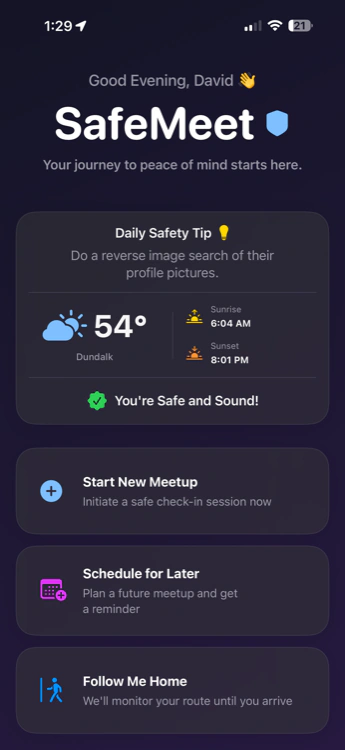
Six steps, then it runs itself.
However you use it — a date, a walk, a drive — starting a session works the same way.
- 1
Open SafeMeet
Launch the app and tap New Session from the home screen.
- 2
Pick who's watching
Choose one or a few trusted contacts to receive updates. They don't need SafeMeet installed — a shared link works too, though it's best if they have the app.
- 3
Set your time and check-in rhythm
Tell it how long you'll be out and how often you want to check in — every 1, 5, 10, or 15 minutes.
- 4
Start the session
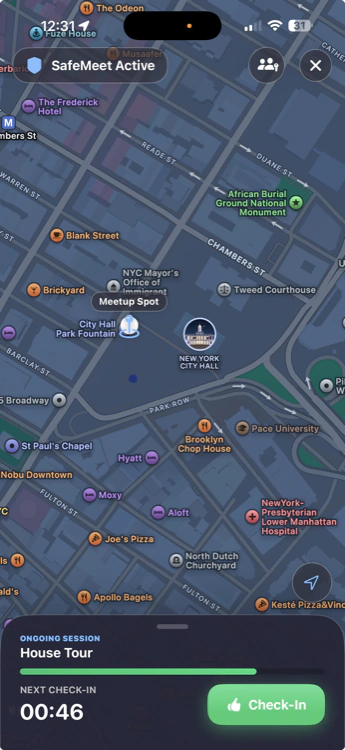
One tap and it's running. SafeMeet quietly shares your live location with the people you picked.
- 5
Check in when it asks
A gentle prompt shows up at each interval. Tap "I'm Safe" and everything stays calm. Miss one, and a short grace window opens before anyone's told.
- 6
Arrive safe, or get help fast
Tap "I'm Home" to end things cleanly. If something's actually wrong, one tap sends your location, battery, and a short audio clip straight to your contacts — no need to explain yourself in the moment.
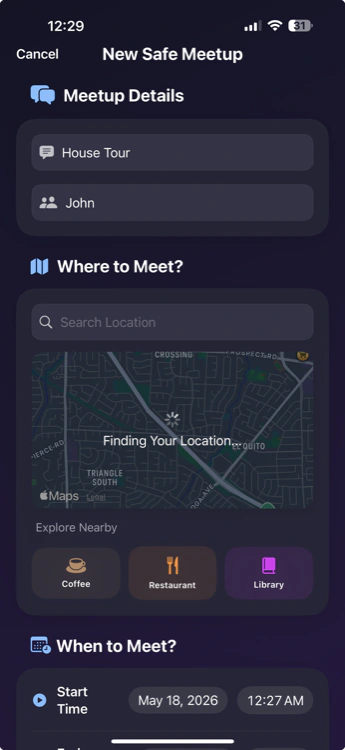
Setting up a session
Choosing who's watching
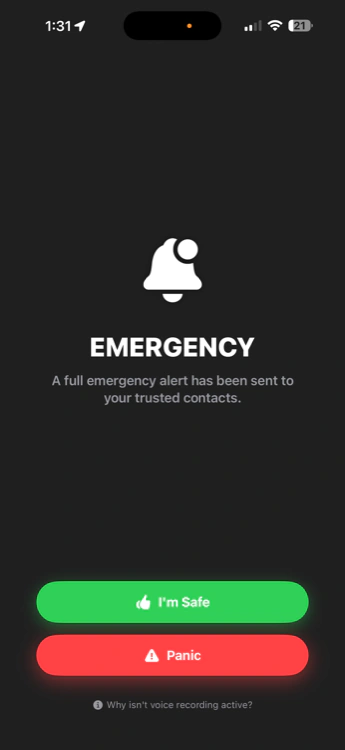
A check-in prompt
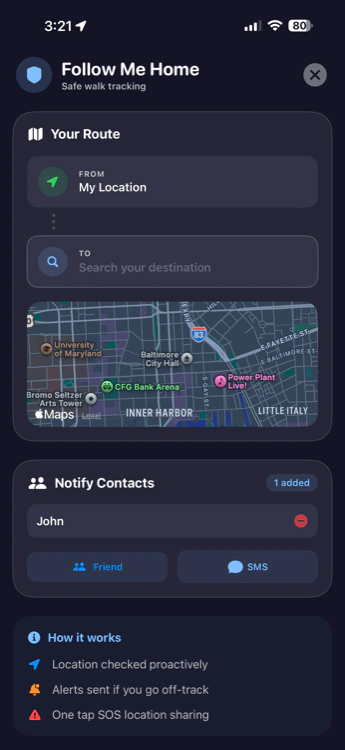
Follow Me Home, live
Three ways to run it
All three work the same way underneath — check-ins, live location, a silent alert if something's wrong. The difference is just what kind of moment they're built for.
Meetups
Set it up ahead of time for a specific plan — a first date, a house showing, a Marketplace pickup. Pick the place, the time, and who's watching before you even leave.
Follow Me Home
For the walk, drive, or ride between two points. SafeMeet follows your route and notices if you head somewhere unexpected or stop moving when you shouldn't.
Watch Over Me
An open-ended session for anything else — a solo hike, a night out, a delivery run. Start it whenever you want a second set of eyes, no plan required.
Feel steady, not scared.
Having someone quietly watching isn't about expecting the worst — it's about not having to think about it at all. You show up, you focus on the date or the drive or the trail, and the safety part takes care of itself.
You stay in control
You choose who watches, for how long, and you can end a session the moment you're done — no lingering, no leftover access.
Nothing happens if nothing happens
Your contacts don't get pinged unless you miss a check-in or ask for help. No blow-by-blow updates, no awkward "you good?" texts.
Help doesn't wait on you to explain
If something's wrong, your people already have your location and a recording. You don't have to find the words in the moment.
It runs quietly in the background
Lock your phone, keep talking to whoever you're with, forget it's even on — SafeMeet keeps working without you thinking about it.
Where it actually gets used
Not a general tracking tool — a quiet layer for the specific moments that make people a little uneasy.
First dates
Meeting someone from an app for the first time? Start a Meetup before you leave. If the date's going great, nobody hears a thing.
Late-night walk home
Parking garage, a dark block, a walk from the train. Turn on Follow Me Home and someone knows the moment your route looks wrong.
Rideshare rides
Hop in, drop a pin on where you're headed, and let a Follow Me Home session ride along with the driver's route.
Real estate showings
Showing a property to someone you just met online? Your broker or a friend can see exactly where you are the whole time.
Marketplace meetups
Selling a couch to a stranger from Facebook or Craigslist? Run a quick Meetup for the pickup — location shared automatically, audio if you need it.
Solo hikes
Spotty signal isn't a problem for the plan — tell someone your trail and your expected return time with Watch Over Me before you head out of range.
Good to know before you start
What is SafeMeet?
SafeMeet is a personal safety app for iPhone. It shares your live location with people you trust, checks in with you on a schedule you set, and can send a silent alert with your location and a short audio clip if you need help.
What's the difference between a Meetup, Follow Me Home, and Watch Over Me?
A Meetup is for a specific plan you set up ahead of time, like a date or a pickup. Follow Me Home follows your route between two points, like a walk or drive home. Watch Over Me is open-ended, for anything else — start it whenever you want a second set of eyes.
What happens if I miss a check-in?
A short grace window opens first, so a slow reply or bad signal doesn't set off a false alarm. Miss that too and your contacts get your live location, battery level, and a short audio clip.
Does the person I'm meeting know I'm using it?
That's up to you. SafeMeet runs quietly in the background — nothing on your screen or theirs gives it away unless you choose to share a link with them too.
Do I need cell service the whole time?
Location is more reliable with signal, but SafeMeet keeps trying to check in and will share your last known location and time if you drop out of coverage.
Is SafeMeet free?
Yes. Live sharing, check-ins, and the silent alert are free on iPhone. Premium adds extras like an app-less, PIN-protected link for people who don't have SafeMeet.
Start your first session in under a minute.
Free on iPhone. No credit card, no long setup — just someone watching your back.
Get SafeMeet free — iOSCore safety features are free. SafeMeet is a safety aid, not a replacement for emergency services.